


PicMa: AI Video&Photo Enhancer
4.32.21K Reviews
App Specs
- Version
- 3.7.21
- Updated On
- License
- Free
- Downloads
- 5,000,000+
- Developer
- MTTech Ltd.
- Categories
- Photography
- Platform
- Android, iOS
Screenshots






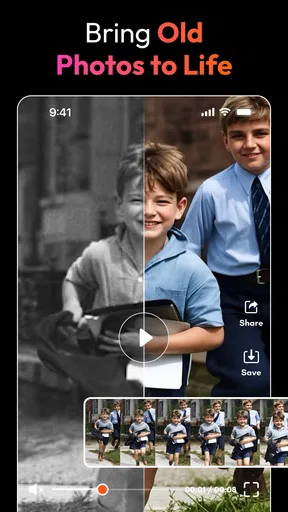
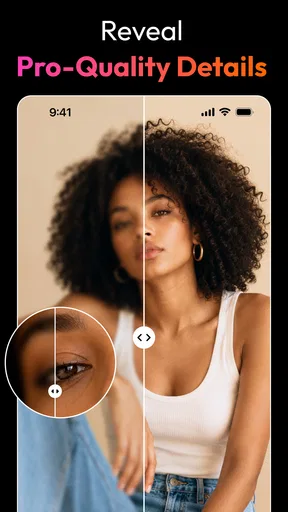
 Analysis by AppCompare
Hey there! So, I’ve been playing around with this nifty app called PicMa: AI Video&Photo Enhancer, and let me tell you, it’s quite the game-changer for anyone who loves snapping pics and shooting videos. If you've ever wished you could magically enhance those not-so-perfect shots, this app might be your new best friend.
What PicMa is like now
PicMa is a photography app from MTTech Ltd. that puts AI-led editing within reach of people who don’t want to learn a full editing suite. It is free to install, though in-app purchases range from $0.99 to $99.99 per item, so I’d treat the free experience as a way to decide whether its particular style and tools suit you before paying for anything. Its Teen content rating is also worth noting if you’re choosing apps for a younger family member.
The app’s current version is 3.6.35, and it runs on Android 6.0 or later. It has been available since November 22, 2021, so this is not a brand-new experiment with AI editing. Its 4.3 average from around 139,000 ratings and more than five million installs suggest that many people have tried it, although popularity alone cannot tell you whether its look will match your taste. I’d judge it by the results on your own pictures, especially portraits and older images where automatic enhancement can be subjective.
What I find most useful about the current direction is its broad mix of photo and video ideas. Alongside enhancement, the app’s presentation points toward AI video creation, filters, dress-up effects, and themed interactions such as kiss-and-hug clips. That variety makes PicMa more of a playful creation and touch-up toolbox than a precise, traditional photo editor. If you arrive expecting careful control over every tonal adjustment, you may find its guided approach limiting; if you want quick experiments, that same approach keeps the first step simple.
Getting Started with PicMa
Diving into PicMa is as easy as pie. Once you download it, you're welcomed with a clean and intuitive interface. No overwhelming menus or confusing buttons; just straightforward options that make the whole experience smooth sailing. The app is designed to enhance your media using AI technology, promising to breathe new life into your photos and videos.
Features that Shine
Now, let’s talk about the features because this is where the app truly shines. First off, the AI enhancement is pretty impressive. You simply select a photo or video, and the app works its magic to improve clarity, color, and overall quality. It’s like having a professional editor in your pocket.
One of my favorite things is the batch processing feature. If you’re like me and have a million photos from a single event, this feature will save you tons of time. Just select a bunch of files, and the app enhances them all in one go. It’s perfect for those massive photo dumps from your last vacation.
Worth Reading Before You Choose

EA SPORTS FC Mobile 26 Is a Bigger Football Game, but It Takes Time

Flipboard Shows What News Apps Must Do Beyond the Feed

Switching to Android Auto Means Rethinking Your Driving Routine

Google Calendar Makes a Crowded Week Easier to Manage

Ludo King Makes the Most of the Minutes Between Plans

Baby Panda World Brings Quick Play to Modern Phones, but Its Game Library Feels Busy
A practical way to use the tools
I’d use batch enhancement selectively rather than sending an entire camera roll through at once. For a family gathering, I might first pick the handful of photos that are slightly soft or dull, process those together, then compare them with the originals before sharing. That extra check matters because a batch can save repetitive work, but it can also apply a look that does not flatter every scene equally. A dim indoor portrait, a bright landscape, and a close-up may need different treatment even when they come from the same event.
For video, I’d start with a short clip rather than a long recording. That gives you a quick way to judge whether the result suits the moment before spending time on a bigger project. The same cautious approach helps with stylized effects: try one on a copy or a low-stakes image first, then decide whether the effect feels fun or distracts from the person or memory you wanted to keep. AI results are best treated as interpretations, not faithful restoration.
A useful habit is to keep an untouched original whenever an edit is important. Enhancement can improve a file’s immediate impact, but the original remains valuable if you later want a subtler look or a different crop. I also wouldn’t assume every picture needs the strongest available treatment. A lightly improved photo often feels more believable than one pushed until skin, texture, or fine details look overly polished.
Why You’ll Love It
I’ve tried a lot of editing apps, but what sets this one apart is the simplicity combined with powerful AI capabilities. You don’t need to be a tech wizard to use it. The app’s user-friendly design makes it accessible to everyone, from casual photographers to social media influencers.
Plus, the AI is constantly learning. The more you use the app, the better it gets at enhancing your media. It’s almost like it’s evolving with you, adapting to your style and preferences over time.
Who will get the most from it
I think PicMa makes the most sense for someone who wants a quick before-and-after improvement without spending an evening adjusting sliders. It can be handy for refreshing old personal photos, preparing a few images for a family chat, or making casual social posts look more polished. Its playful video and filter direction also suits people who enjoy trying an effect for a laugh or making a short, shareable moment rather than producing a carefully graded film.
It is less convincing as a one-stop choice for photographers who need predictable, repeatable color, detailed retouching, or precise control over a final image. For those jobs, a conventional editor with manual adjustments is usually the better tool. Likewise, if you mainly want to organize a large library, crop and straighten images, or manage a consistent workflow, a dedicated photo-management or editing app may be a more practical fit. PicMa’s appeal is quick AI-led transformation, not replacing every part of a photographer’s toolkit.
How it compares with familiar editors
Compared with a standard phone editor, PicMa puts more emphasis on automated changes and novelty. A built-in editor is often quicker for a simple crop, exposure correction, or small color adjustment because it avoids choosing an AI effect at all. PicMa is the more interesting option when a photo needs a stronger lift or when you want to explore creative treatments. The trade-off is that automation can make decisions you would rather make yourself.
Compared with a full desktop-style editor, it favors convenience over fine control. That is a fair exchange for casual use: you can try an idea without learning a complicated set of tools. But if the image is for a portfolio, a print, or a project where consistent skin tones and detail matter, I’d finish it in a manual editor and use PicMa only as an experiment. The best choice depends less on which app has more effects and more on whether you want the software to make the decisions or want to make them yourself.
Room for Improvement
Of course, no app is perfect, and there are a few things I’d love to see improved. For instance, while the AI does a great job, sometimes the enhancements can be a bit too much, making images look slightly unnatural. A bit more control over the intensity of the edits would be awesome.
Also, while the app is free, some features are locked behind a paywall. It’s understandable, but for those who want the full experience, be prepared to spend a little extra.
Before paying, I’d test the tools that matter to you and check whether the free options already cover your usual tasks. The purchase range is wide enough that I would not treat every paid feature as a small add-on; compare the cost shown in the app with how often you expect to use that specific tool. If your interest is only occasional enhancement, a free option on your phone may be enough. If one of PicMa’s distinctive effects becomes part of your regular routine, paying may feel more reasonable, but I’d decide based on repeated use rather than a single impressive preview.
There is also a practical quality question: an AI result can look strong on a small screen and less convincing when you zoom in. I’d inspect faces, hair, edges, and background details before using an edited image somewhere it will be viewed closely. For a quick social post, a slightly stylized result may be perfectly fine; for a keepsake or a professional image, I’d be more selective and compare it carefully against the original.
What to expect as it develops
The confirmed version history gives a useful point of reference without promising what comes next: PicMa has reached version 3.6.35 after first appearing in 2021. That tells me the product has continued to receive versions over time, but it does not guarantee a particular new tool or improvement. Existing users can reasonably focus on whether the current release still handles their favorite workflow well and whether the app’s present mix of enhancement and creative effects matches how they use it now.
If you already have a routine in PicMa, I’d keep a few representative originals and edited results as a personal comparison set. When you revisit the app after an update, those same images make it easier to notice whether the output has changed in a way you like, without relying on memory. For new users, the sensible thing to watch is not a promised feature but the balance between easy automation, meaningful control, and the cost of the tools you actually want. That is what will determine whether the app remains useful beyond the first novelty session.
Final Thoughts
In a nutshell, PicMa: AI Video&Photo Enhancer is a fantastic tool for anyone looking to enhance their media quickly and effectively. Whether you’re looking to make your Instagram feed pop or just want to improve those cherished family photos, this app has got you covered. It’s easy to use, effective, and quite frankly, a lot of fun. So, go ahead and give it a shot—you might just find it becomes your go-to editing app!
My recommendation comes with one qualification: think of PicMa as a fast, creative helper rather than a replacement for every editor on your phone. I’d keep it in my rotation for casual enhancement, quick experiments, and the occasional playful video idea, while turning to a manual tool when accuracy and control matter more than speed. If that distinction fits the way you take pictures, it is well worth trying; if you dislike AI deciding how your images should look, the usual editing alternatives will likely suit you better.
Pros
- Enhances images with impressive AI accuracy.
- User-friendly interface for easy navigation.
- Quick processing time for photo enhancements.
- Supports a wide range of photo formats.
- Offers both basic and advanced editing tools.
Cons
- Requires a stable internet connection.
- Limited free features; many tools are paid.
- Some enhancements may appear artificial.
- Heavy on battery usage during processing.
- Occasional crashes on older devices.
FAQs for PicMa: AI Video&Photo Enhancer
What is PicMa: AI Video&Photo Enhancer?
PicMa: AI Video&Photo Enhancer is a cutting-edge application designed to enhance the quality of your videos and photos using advanced AI technology. It automatically improves resolution, sharpens details, and adjusts colors to bring out the best in your media, all with just a few taps.
How does the AI enhancement feature work in PicMa?
The AI enhancement feature in PicMa utilizes machine learning algorithms to analyze your photos and videos. It identifies areas that need improvement, such as blurriness or poor lighting, and applies enhancements to improve clarity, brightness, and overall quality, making your media look professionally edited.
Is PicMa compatible with all devices and formats?
PicMa is designed to be compatible with a wide range of Android and iOS devices. It supports various photo and video formats, ensuring you can enhance media captured from different sources. However, checking specific device requirements and supported formats on the app's download page is recommended.
Does using PicMa require internet access?
PicMa primarily functions offline once downloaded, allowing you to enhance your media without an internet connection. However, certain features, such as updates and cloud storage options, may require internet access to function properly and provide the best user experience.
Are there any subscription fees associated with PicMa?
PicMa offers both free and premium versions. The free version includes basic enhancement features, while the premium version provides advanced options and tools. Subscription fees for the premium version vary, and users can choose between monthly or annual plans based on their needs.


